Install Guide
Table of Contents
Content
Credit to Seres (@Seres67) for taking these pictures.
Platform recommendations
Linux
Using Steam or Heroic Launcher is likely best here. Please use some kind of Wine or Proton newer than Wine 8.
MacOS
Using Heroic Launcher is recommended on macOS. Please for the love of all that is good in this world, do not use Whiskey. They ship Wine 7. It's rough.
If you do pay for Crossover and wish to use it, set Graphics to DXMT, Synchronization to MSync and in winecfg set d3d11.dll to native-then-builtin. A user reports that DXVK was extremely stuttery and D3DMetal doesn't work properly with Nexus.
Windows
It already works?
Instructions and supported addon loaders
Nexus
-
Have Nexus installed.
-
Launch the game to find and install TaimiHUD within the Nexus Library.
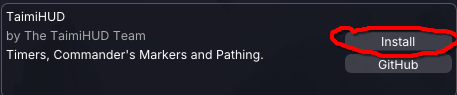
-
Install some packs from the in-game downloads and explore from there!
Prereleases, if you want them
See also: Feature Testing
-
Hit configure for TaimiHUD within Nexus.
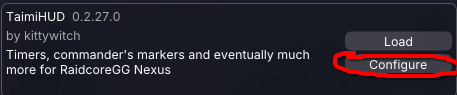
-
Enable
Allow Pre-Release Updatesfor TaimiHUD within the configure area.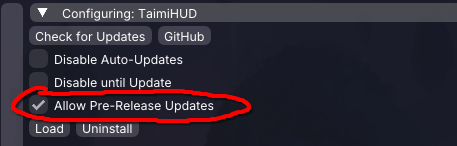
-
Check for updates to make Nexus download the pre-release version of TaimiHUD.

ArcDPS
- Have ArcDPS installed.
- Obtain the latest release for TaimiHUD.
- Place the DLL into the same folder as ArcDPS's dll
(usually the equivalent ofC:\Program Files\Guild Wars 2\for your system).
Pathing enablement
-
Enable
KatRender Pathing (Experimental)from within the TaimiHUD window's Pathing Options tab.
When installed by Nexus, most settings can alternatively be reached through the Configure area for the addon:
-
Within the Data Sources tab of the TaimiHUD primary window and settings, refresh the data sources list.
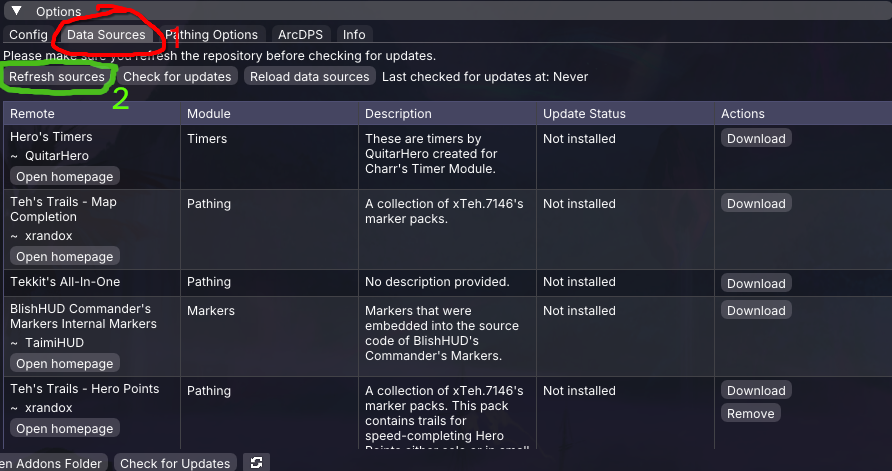
-
Install the pathing packs you desire.
-
Open the Pathing window to customize your experience. It can be accessed with the keybind found in Nexus or ArcDPS settings, as well as by the Nexus quick-access button at the top of the screen.
